Más filtros

Service account

ltanase13
Actualizado 2019-04-25 01:26:55 UTC 
I have a company doing service on my sprinkler system, and would like to have them able to turn zones on/off to verify coverage and do repairs. Does anyone know how can that be done without me giving them my phone?
Ver: 6849   Respuesta: 1

Answers?

Howard Blankenship
Actualizado 2019-04-24 14:46:54 UTC 
Many good questions here in the community but unable to see the answers - why?
Ver: 6465   Respuesta: 1

Alexa

Emilio Maione
Actualizado 2019-04-24 06:50:56 UTC 
Salve a tutti come faccio a collegare lo sprite  alla Amazon Alexa chi può dirmi come faccio grazie
Ver: 6904   Respuesta: 1

Whisper to standalone zone - Error

John Mac
Actualizado 2019-04-22 23:42:30 UTC 

Hello!  I just got a whisper and wanted to add it to a stand-alone zone but keep getting the following error: Error no info about this zip code in our DB. Any thoughts?  I can add it to one of my other zones?  


Thanks. 

Ver: 6609   Respuesta: 1

Weather Company API- Revenue stream for Netro

Kirk Davis
Actualizado 2019-04-20 12:58:20 UTC 
Tema: General
It is my understanding that you could restore our ability to pull data into netro from our individual weather stations. This would require paying for the API, which you could mark up 20% and offer a paid option to netro clients. $3.99 a year, for example, would be totally worth it to get accurate information to my sprinkler controller. As I have outlined in a previous post, dark sky has proven to be wildly inaccurate. It's Miss estimates rainfall by at least 50%, on average, and is within three degrees plus or minus on high temperature only about 50% of the time.
Ver: 7926   Respuesta: 4

Irritating - Dark Sky is junk.

Kirk Davis
Actualizado 2019-04-20 12:21:46 UTC 

Why can't I see the assumption Netro is making on the amount of rain that fell the day before? I paid Dark Sky for the time machine feature, but it's never accurate Yesterday  it rained here over an inch (rain gauge and $250 weather station agreed)  Dark Sky time machine (no, not Hot Tub time machine) reported  25 inch. At the very least I should be able to go into the app and put the actual rain that fell for the day before. Is there a way to do it, and if not, will you please add it? I would get a Whisperer, but the feedback has been rather poor on here. 


The community is nice, but how am I supposed to see answers? It shows "Answers 2", for example, but you click in it, and noting happens. Irritating 


Thanks, 

Mr Bad Example 

Ver: 7217   Respuesta: 1

Suggestion: Sunrise smart watering

Mark S
Actualizado 2019-04-15 13:39:43 UTC 
I think Rachio adjusts the watering schedule with sunrise to have all zones completed as the sun is coming up. Is this something you intend to add? I think this will come in handy with the heat of summer.
Ver: 6899   Respuesta: 1

Smart Watering Basic with a schedule watering adjustment

Barry Perfect
Actualizado 2019-04-13 17:00:37 UTC 

If I have a zone set to Smart Watering - Basic with a schedule to come on for 30 minutes, will the smart watering adjust the duration of the watering based on the weather (say 10 minutes when it’s cool, the full 30 minutes when it is hot), or just turn it off/on based on the 5mm expected rain threshold?


Barry

Ver: 6668   Respuesta: 1

Smart home integration

Matt Griste
Actualizado 2019-03-29 22:29:57 UTC 
How do i add the netro service to my google home. I cant seem to find much info about it and it doesnt show up
Ver: 7261   Respuesta: 2

MAC address

Lee Hill
Actualizado 2019-03-29 15:45:44 UTC 
where can I read MAC address of netro controller?
Ver: 7031   Respuesta: 1

windy conditions

Magnus Swenson
Actualizado 2019-03-27 20:05:53 UTC 

The setting for windy conditions is great.

However the zones that includes drip irrigation doesn’t get impacted by winds (since they’re often under dirt/mulch etc) usually rotors and nozzles would be impacted . Is there a way not to include in ground drip irrigation on windy conditions?

Ver: 6946   Respuesta: 1

controller firmware

Magnus Swenson
Actualizado 2019-03-27 19:55:40 UTC 
Tema: General
Does the controller update its own firmware automatically on a specific schedule or you push out when needed?
Ver: 7459   Respuesta: 1

Not able to water

Tungster Tran
Actualizado 2019-03-27 13:18:49 UTC 
I just updated the app yesterday and noticed that I am not able to water my lawn any more.  Kept trying to water it manually and it kept shutting it down or the zone was never turned it on.
Ver: 7332   Respuesta: 1

Update frequency of watering schedule

charu
Actualizado 2019-03-21 16:27:21 UTC 
How often is the smart watering schedule updated? This morning it was raining quite a bit, but so far my watering schedule indicates a watering session for tomorrow. Not only does this waste water, but it violates one of my restrictions, namely, no watering the day after a rain. 
Ver: 6625   Respuesta: 1

Device sharing between multiple users

Netro Support
Actualizado 2019-07-29 03:11:08 UTC 
Device sharing between Netro users is supported. A user can authorize multiple users to access his or her Netro products.

To give access to other users, please log in your Netro account, go to Settings->Controller->Manage Users.

Note: Shared users must have a Netro account.
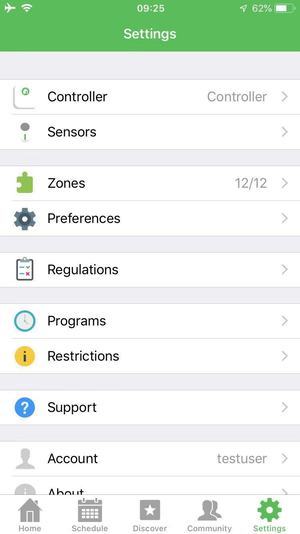

Add or delete users

Device owner can add or delete users through adding or deleting their user name or email account.

Tap “Manage Users” to authorize other users to access the device owner’s Netro products.
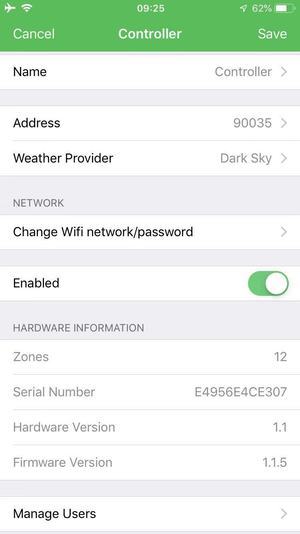

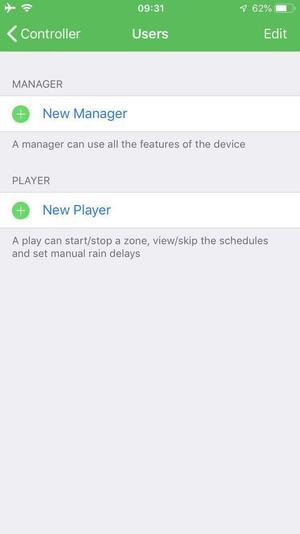
Tap “Manage Users” and then you will be directed to the “Users” Page.

Then you can add new manager or new player by tapping the “+” button.
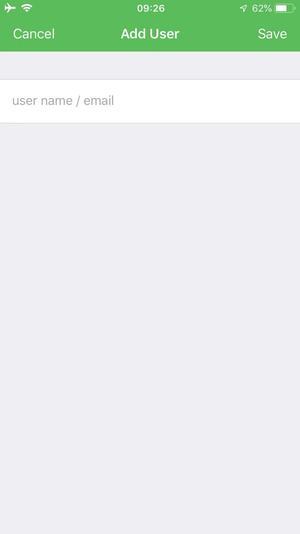


Tap the “+” button and input the user name or user account.

Please input the user name or user account.
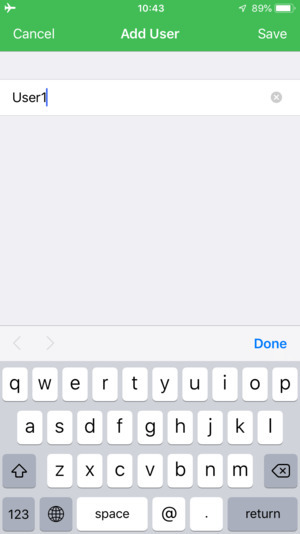

Tap “save” and then the user can have access to owner’s shared device.

Users’ information is displayed on “Users” page.
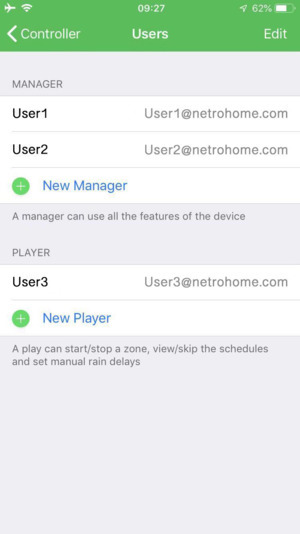


Once users are added, shared users will be shown on “Users” page.


 Access rights of shared users


There are two different types of shared type: Manager and player. Manager and player have different access rights. Manager has more access rights than player. Both manager and player cannot delete controller, change address, delete or add sensor.

Note: Shared users must have a Netro acccount.

Manager’s access rights:

Manager can use all the features of the shared device except deleting controller, changing address, deleting or adding sensor.

Player’s access rights:

a. Read-only: All settings in Controller, Sensors, Program(except run a cycle), Zone list can not be edited.

b. Hide: Preferences, Regulations, Restrictions, zone detail are not shown on Settings page. Regulations events and Restrictions events created by users are not shown on Schedule page.

c. Access to Schedule page: Player can create a one-time Run or Rain Delay on Schedule page.

d. Access to Program:Player can only do “run a cycle now” to programs created by device owners. Player can create a one-time Run or Rain Delay on Schedule page.



Ver: 12002   Comentario: 4

Kickstarters for Pixie, the Smart Hose Faucet Timer

Netro Inc
Actualizado 2019-06-05 01:59:12 UTC 

To the Netro community:


We are very excited to introduce our new product, Pixie, the WiFi-connected Hose Faucet Timer. We have spent almost a year designing and developing the smart timer and now it is ready to meet the users.  


We believe Pixie is a great choice if you have water systems running through hose faucet. It is as smart as Sprite and can pair with Whisperer. It is solar powered and has a removable battery for quick charge. If you like the features in the Netro app, it has all the access to them.


For more information about Pixie, please email to info@netrohome.com or simply leave a message/comment below and we will send you a promotion code for the first 50 buyers.


Thanks,

Netro Inc

Ver: 379356   Comentario: 24

Notice To Users of Weather Underground

Netro Inc
Actualizado 2019-03-19 04:52:48 UTC 

Notice of obsoleting Weather Underground


Netro has changed the weather source Weather Underground to Dark Sky from the server side for users of Weather Underground. The reason is Weather Underground stopped its API service without any notice. The whole community is looking for solutions. So we have internally disabled the Weather Underground option and used the data from Dark Sky.


We will support AccuWeather and openWeatherMap in the next release of the app. We expect to launch it early next month.

We are sorry about the inconvenience. Please contact us if you have any questions.


Regards,

Netro

Ver: 9436   Comentario: 0

Overriding smart waterinh

mvernia
Actualizado 2019-03-17 20:46:27 UTC 
I own a very small lot and would be interested only in setting up my own programs. How can I override the system's smart watering schedule? I installed a new Netro Sprite today and right off the bat it shows a lot of watering on the first day. Thank you.
Ver: 6746   Respuesta: 1

Instructions about Replacing Old Controller

Netro Support
Actualizado 2019-03-20 08:03:05 UTC 

Replacing old system


This page lists some instructions about replacing old controllers with Netro smart watering controller. 


Example 1:


I check the pictures.

Here is how you connect to your sprite:

OLD                 Sprite

24VAC             24VAC (order does not matter)

COM                any C slot

1                     1

2                     2

3                     3

4                     4

You probably do not need to connect other wires.


Example 2:


You do not have a master valve so you just leave the M slot open.

The sensor wires are not needed either in the Sprite because it gets the weather data from WiFi network.


Example 3:


If you are using the Netro power adapter, the two thick beige wires should not be used because they are the 24 VAC power wires from your old power adapter.

However, you probably can use these two beige wires on Sprite. Just hookup them on the 2 24V AC slots in Sprite on the right side. I would suggest using a voltage meter to check the voltage on them though if you go this way.


Example 4:

1. The VC wire goes to any one of the C slots in Sprite

2. The 1-8 wires go to 1-8 slots in Sprite which is straightforward

3. Use the Netro power adaptor to connect the 24VAC in Sprite

Other wires are not needed.

Example 5:


The 8 zone wires will go to the 1-8 slots in Sprite.

The C wire will go to any of the C slots in Sprite.

You can leave the M slot in Sprite on unconnected.


Ver: 7780   Respuesta: 0

Instructions about Replacing Orbit System

Netro Support
Actualizado 2019-03-20 08:07:49 UTC 

Replacing Orbit system


This page lists some instructions about replacing the common types of Orbit system with Netro smart watering controller. 


Example 1:

 Replacing Orbit model with Netro (model 57114-WT2X 4 stations)


You have 2 common wires and you can insert them into the 2 C slots in the Sprite controller.

You have 4 zones and you can use the 1-4 slots in Sprite to connect the 4 zone wires.

The last step is to hook up the 2 power wires using the Netro power adapter.


Ver: 11141   Comentario: 0